How Does Wi-Fi Send Information Through the Air?
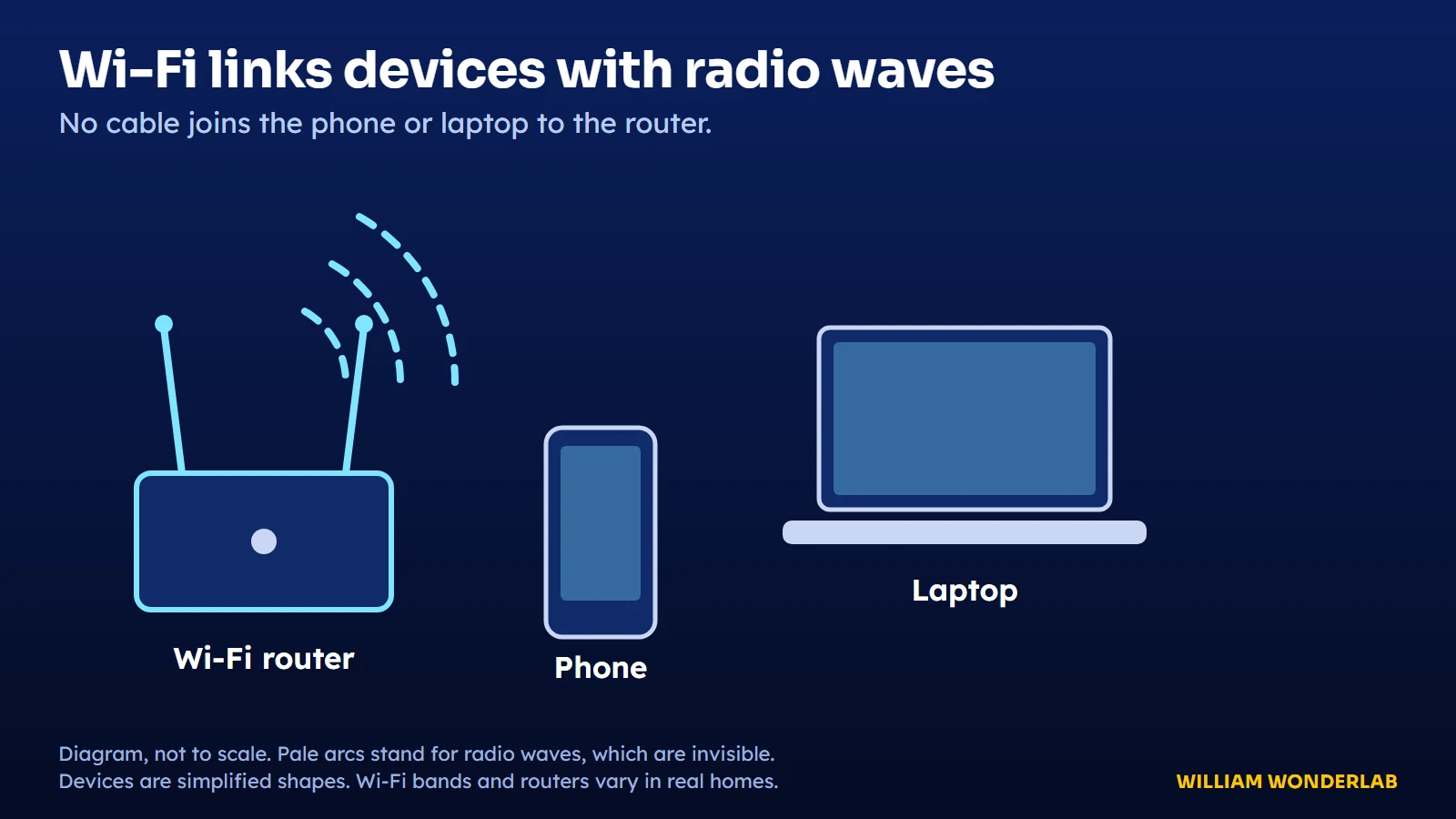
Wi-Fi sends information using radio waves, which are electromagnetic waves rather than sound. The data is carried by changing the wave, and Wi-Fi uses bands such as 2.4 GHz and 5 GHz.
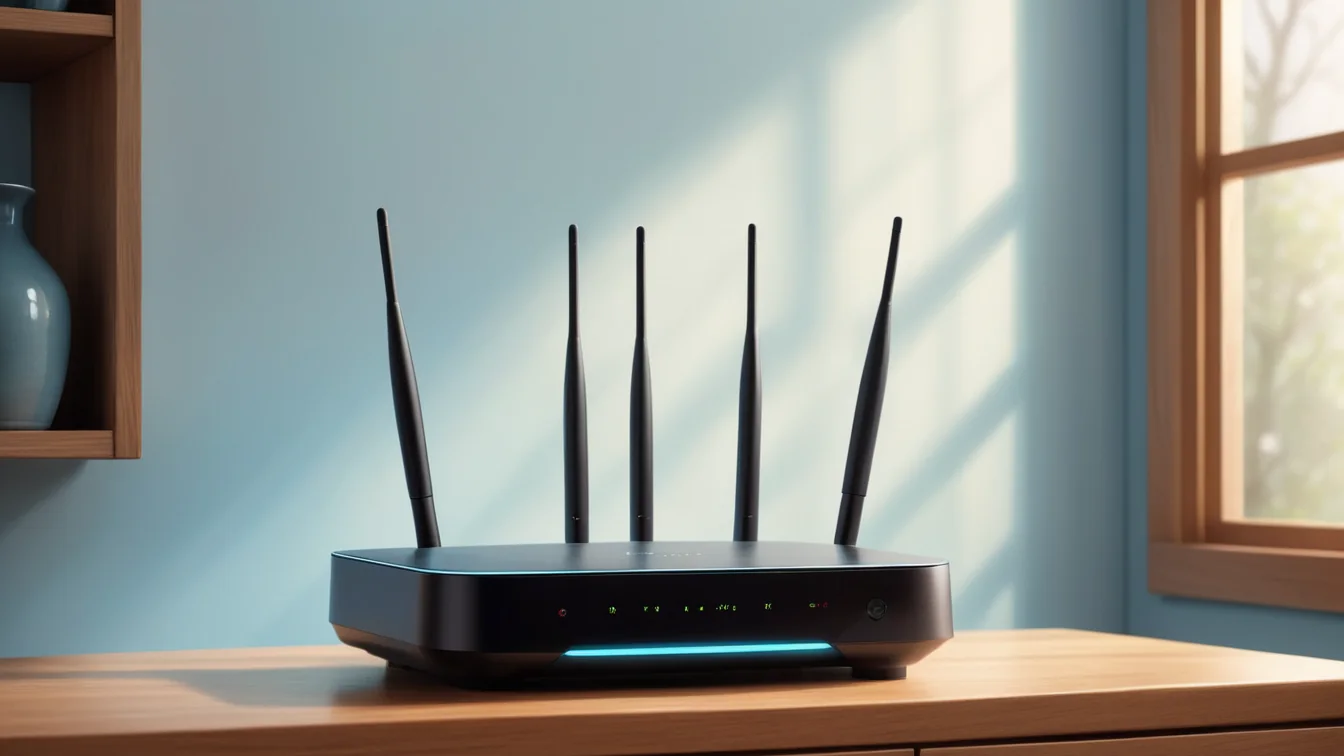
Your tablet can stream a film while it sits on the couch, even though no cable joins it to the router. The information seems to cross the room through thin air. So what actually travels, and how does a string of 1s and 0s get from one place to another without wires?
The short answer: Wi-Fi sends information using radio waves, which are electromagnetic waves, not sound. The data is carried by changing the wave in a pattern that matches the bits (the 1s and 0s of digital information). Wi-Fi uses radio bands such as 2.4 GHz and 5 GHz, and the receiving device reads the pattern back into data.[1][2]
Radio waves are not sound
Sound is a pressure wave in a material such as air or water. Stanford’s lecture notes put the difference this way: for sound, each frequency is “a literal pressure wave,” but in wireless systems a frequency is “an electromagnetic wave oscillating at that rate as it propagates through space.”[2]
Every wave is a disturbance that moves energy from one place to another.[3] Electromagnetic waves are one family of these disturbances, and they can travel through air or empty space.[2] Radio waves belong to that family, which is why a phone can receive a signal from across a room without any wire.
Frequency and wavelength
Two words describe any wave. The wavelength is “the length from one wave crest to the next.”[3] The frequency is how many of those wavelengths pass a point each second. It is measured in hertz, which means waves per second.[3]
Think of a skipping rope. If you flick it faster, more loops pass your hand every second, so the frequency goes up. The loops also get closer together, so each loop is shorter.
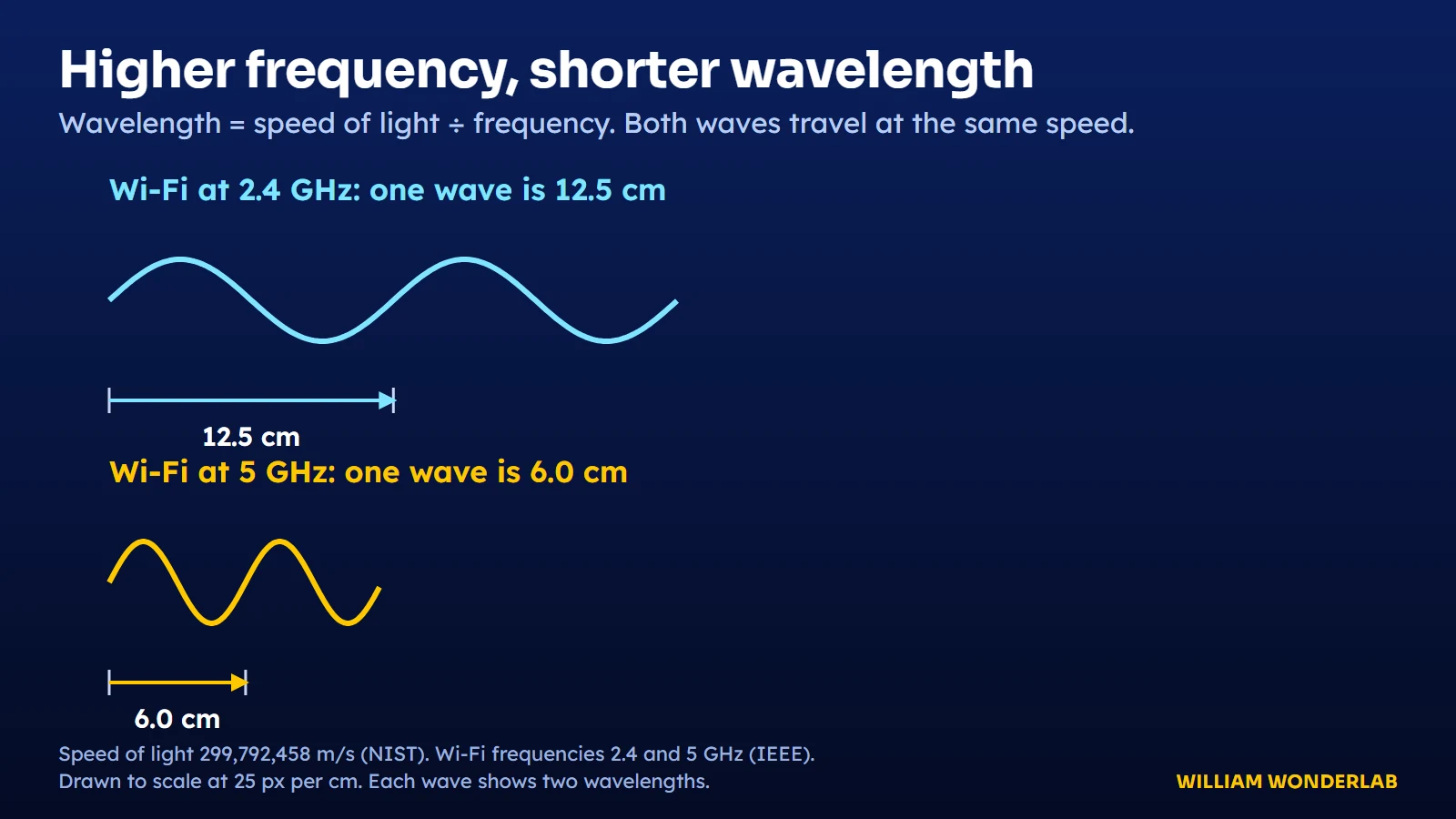
Electromagnetic waves all travel at the same speed. Science Learning Hub describes this as “electromagnetic waves always travel at the same speed (3 hundred million metres per second).”[3] The exact value is 299,792,458 metres per second.[4] Because the speed is fixed, frequency and wavelength trade off against each other. NASA writes that “Wavelength, represented by the Greek lower case lambda (λ), is equal to the speed of light (c) divided by frequency (f).”[5] So a higher frequency means a shorter wavelength.[6]
Wi-Fi frequencies are measured in gigahertz. Giga means a billion, so 2.4 GHz is 2.4 billion waves per second. Using the formula above, each of those waves is about 12.5 centimetres long. At 5 GHz, the wave is about 6 centimetres long, because it wiggles faster.
Wi-Fi’s two main bands
The IEEE, the engineering body that publishes the Wi-Fi standards, describes them as governing how devices transmit and receive data over “unlicensed radio spectrum in the 2.4 GHz, 5 GHz, and 6 GHz bands.”[1] A band is a range of frequencies, a bit like a lane on a road.
The 2.4 GHz Wi-Fi band runs from 2400 to 2483.5 MHz. It is split into channels such as 1, 6 and 11, which let different routers in the same building operate without clashing, as long as each stays in its own lane.[2] The IEEE notes that the 2.4 GHz band “provides only three non-overlapping 20 MHz channels in most regulatory regions.”[1] A second band gives devices another set of lanes.
Frequency also changes how a signal behaves around obstacles. The lecture notes say that walls “might block 5 GHz Wi-Fi signals more effectively than 2.4 GHz signals.”[2] Choosing a band is a trade-off, not a single best answer.
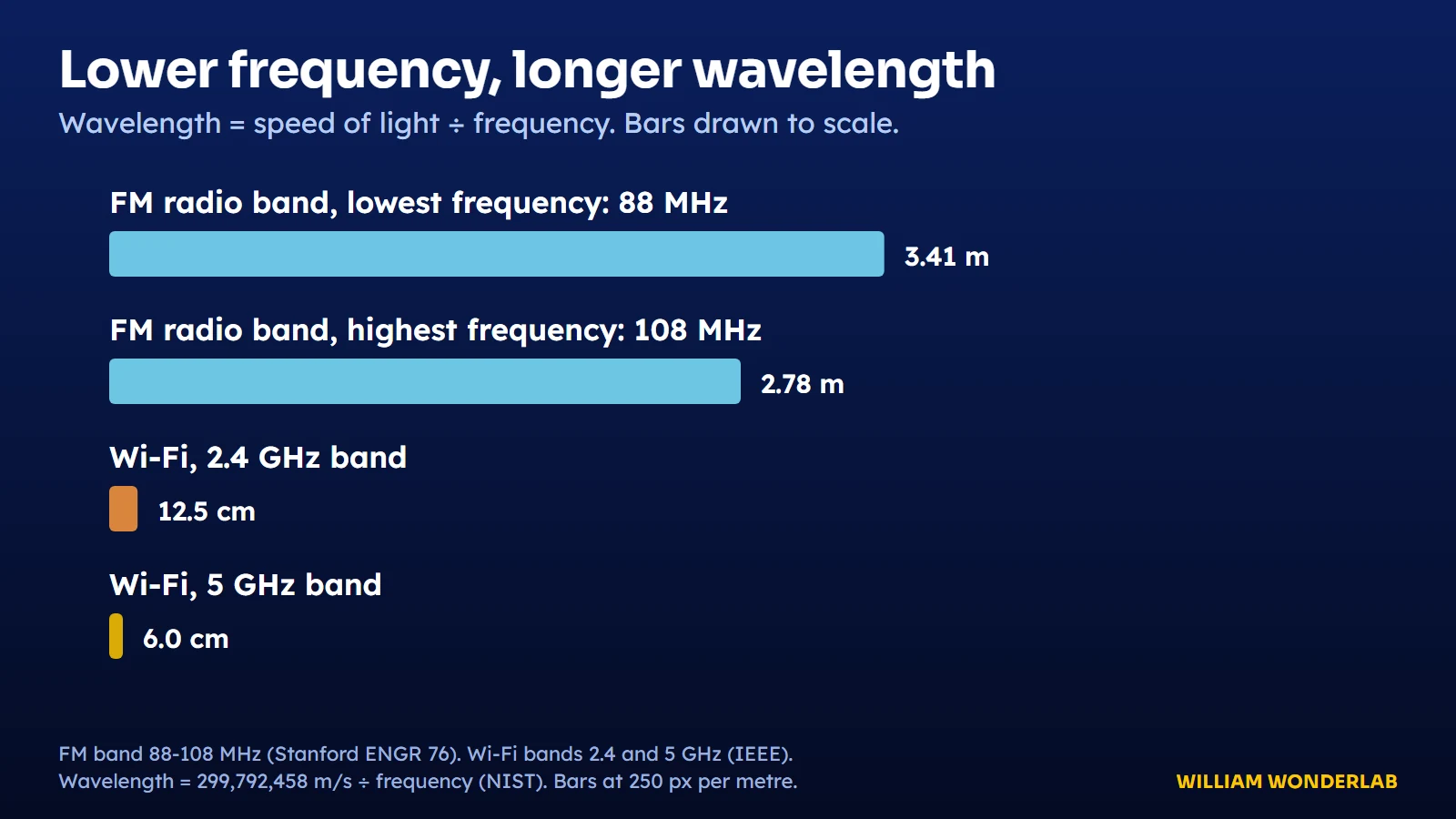
For comparison, the FM radio band runs from 88 MHz to 108 MHz, and its waves are about 2.8 to 3.4 metres long, worked out from the formula above.[2][5]
Did you know? Textbooks give microwave frequencies as running from about 10⁹ Hz to nearly 10¹² Hz.[6] The 2.4 and 5 GHz Wi-Fi bands sit inside that range, so the labels “radio” and “microwave” overlap for Wi-Fi.
Sending data: on, off and changes in between
Engineers call the step of turning bits into a wave modulation. Stanford’s lecture notes define it as “the process of constructing a continuous-time signal s(t) that encodes these bits in a form suitable for transmission over a physical channel.”[2]
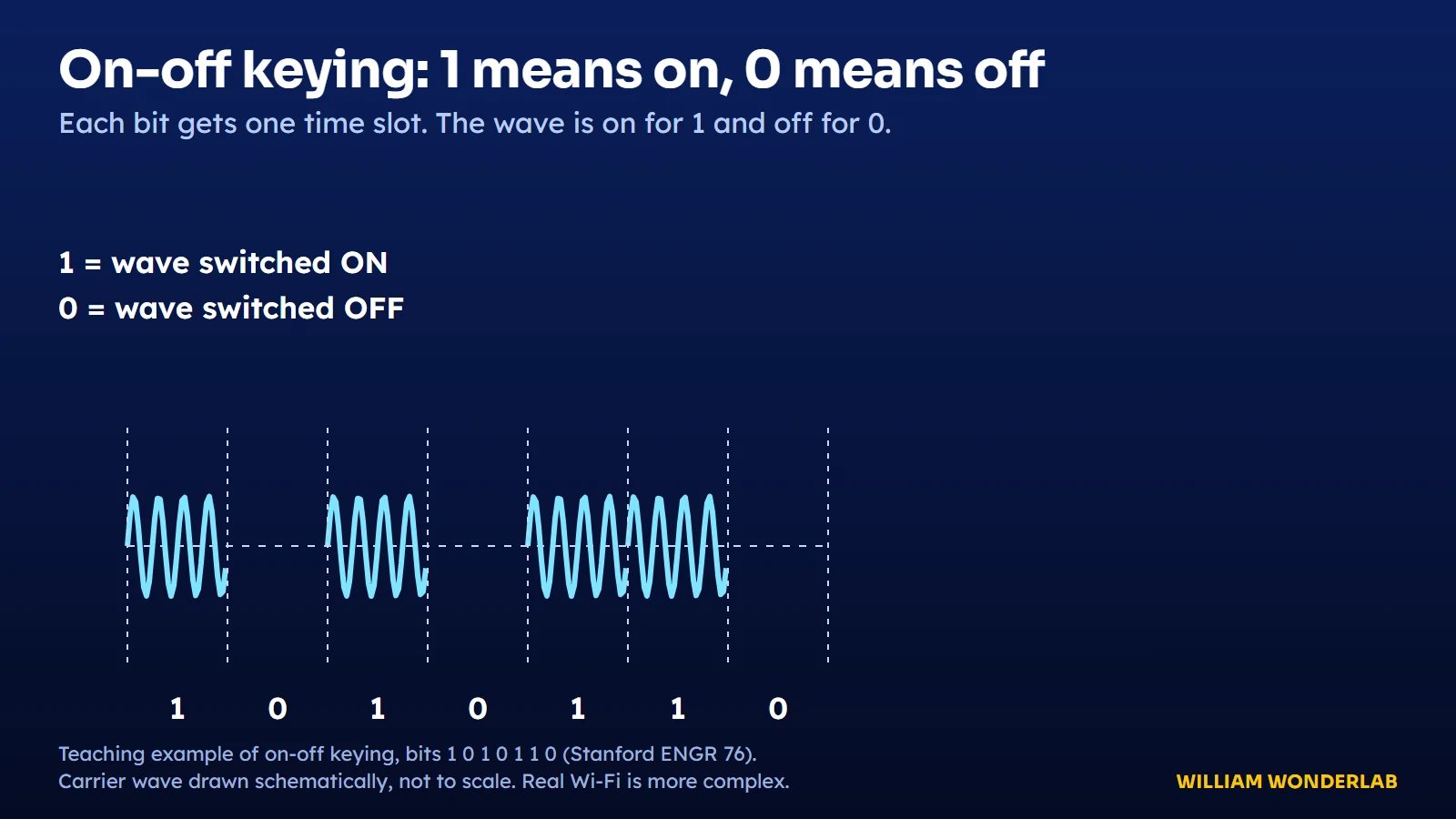
The simplest version is called on-off keying. The notes explain: “A bit 1 is represented by turning the signal ‘on’ at a fixed amplitude, and a bit 0 is represented by turning the signal ‘off’.”[2] The amplitude is how strong the wave is, a bit like how tall a wave is on the sea.
Each bit gets its own short time slot. The bit rate is how many bits are sent per second, and it is one divided by the time allocated to each bit.[2] The notes use the sequence 1, 0, 1, 0, 1, 1, 0 as an example, and the diagram below shows it.
Real Wi-Fi is far more complicated than a single on-off signal. The IEEE notes that 802.11a, which works in the 5 GHz band, “adopted orthogonal frequency-division multiplexing (OFDM), reaching 54 Mbit/s.”[1] OFDM is a more advanced way of packing data into the wave than simple on-off signalling.
A printed pattern can also carry information. For another example, see How Do QR Codes Work?
Why a phone can have a tiny antenna
An antenna is the part that sends out and catches the wave. The lecture notes explain the link between wavelength and antenna size: “To radiate energy efficiently, an antenna’s length must be a significant fraction of the signal’s wavelength.”[2]
Low frequencies have very long wavelengths, so the antenna would need to be enormous. The notes make this point directly: “By shifting the signal to higher frequencies (where wavelengths are centimeters or millimeters), we can use the small, portable antennas found in smartphones and laptops.”[2] Wi-Fi’s gigahertz waves are only centimetres long, so a laptop’s antenna can stay small.
Real signals also fight noise. The notes say that signal transmission “is subject to the harsh realities of the physical world: noise, interference, and the fundamental constraints of bandwidth and power.”[2]
Try it: a paper on-off code
This is a proposed at-home activity that uses paper only.
You need: squared or graph paper, two pencils of different colours, and a partner.
- Draw eight boxes in a row.
- Shade a box to mean 1 (on). Leave it blank to mean 0 (off).
- Fill the row with the pattern 1 0 1 0 1 1 0. Ask your partner to read the message from the boxes alone.
- Swap roles. Make up your own eight-box pattern and see whether your partner can read it back.
What to notice: The message is only a pattern of two states. The order of on and off carries all the information.
Safety first: Paper and pencils only, so there is no electricity, heat or moving parts. Keep pencil points away from eyes and faces, and walk rather than run while holding them. Younger scientists should do this with an adult.
Go deeper: the maths and the receiver
Working out a wavelength
The formula is wavelength = speed of light ÷ frequency.[5] Using the exact speed of light, 299,792,458 m/s,[4] the calculations are:
- 2.4 GHz: 299,792,458 ÷ 2,400,000,000 ≈ 0.125 m, or about 12.5 cm.
- 5 GHz: 299,792,458 ÷ 5,000,000,000 ≈ 0.060 m, or about 6.0 cm.
The 5 GHz wave is shorter than the 2.4 GHz wave by roughly half, because 5 is about twice 2.4.
Reading the pattern back
The receiving side does the reverse of modulation. The notes describe demodulation this way: “given a received waveform y(t), the receiver processes it to produce estimates of the transmitted bits.”[2] Because noise and interference can distort the wave, the receiver works with estimates of the bits, not perfect copies.
Frequently asked questions
Is Wi-Fi a kind of sound?
No. Wi-Fi uses radio waves, which are electromagnetic waves. Sound is a pressure wave in a material such as air or water.[2]
What does hertz mean?
Hertz is the unit of frequency. One hertz means one wave per second, so 2.4 GHz means 2.4 billion waves per second.[3]
Why not use a lower frequency for Wi-Fi?
Lower frequencies have longer wavelengths, so their antennas would need to be much longer. The lecture notes say that transmitting a baseband signal wirelessly would need an antenna many kilometres long.[2]
Why can walls weaken a Wi-Fi signal?
Walls can block or weaken radio signals, and the effect depends on frequency. The lecture notes say walls might block 5 GHz Wi-Fi signals more effectively than 2.4 GHz signals.[2]
Why do Wi-Fi bands have different numbers?
Each number is a frequency. The 2.4 GHz band and the 5 GHz band are different slices of the spectrum, so they have different wavelengths: about 12.5 cm and 6.0 cm.[4][5]
What is a Wi-Fi channel?
A channel is a smaller slice inside a band, like one lane inside a wider road. The 2.4 GHz band is divided into channels such as 1, 6 and 11, so nearby routers can share the band without clashing.[2]
The big idea
The wave carries the pattern. Wi-Fi turns bits into changes in a radio wave, an electromagnetic wave with a set frequency and wavelength. The wave travels through the air, and the receiving device reads the pattern back into data.
Related reading
More from William Wonderlab:
Explore more from scientists:
- Fundamentals of waves (Science Learning Hub)
- IEEE 802.11 Standards (IEEE Technology Navigator)
- Chapter 6: Electromagnetics (NASA Science)
References
[1] IEEE Technology Navigator, “IEEE 802.11 Standards” (accessed 25 October 2026)
[2] Stanford University, ENGR 76 Information Science and Engineering (Spring 2026), “Lectures 11-12: Digital Communication, Modulation, and Demodulation” (accessed 25 October 2026)
[3] Science Learning Hub (New Zealand), “Fundamentals of waves” (accessed 25 October 2026)
[4] NIST (National Institute of Standards and Technology), “Speed of light in vacuum (c)” (accessed 25 October 2026)
[5] NASA Science, “Chapter 6: Electromagnetics” (accessed 25 October 2026)
[6] OpenStax University Physics Volume 2, via LibreTexts, “16.6: The Electromagnetic Spectrum” (accessed 25 October 2026)