How Do Touchscreens Know Where You Touch?
A capacitive touchscreen is covered by a grid of electrodes. Your fingertip changes the electrical link at nearby crossing points, and a controller uses the rows and columns to find the spot.
Tap a phone or tablet screen and the app responds exactly where your finger landed. There is no mechanical switch under each icon. Capacitive sensing lets a touch be detected through changes in electrical capacitance, so the screen does not need a button for every spot.[1]
So how does the screen know where you touched? The answer is a grid of tiny conductors, a fingertip that changes the electrical link between them, and a controller that does the arithmetic.
The short answer: A capacitive touchscreen is covered by a grid of electrodes. Capacitive sensing detects when a finger approaches or touches the surface through changes in capacitance.[1] Where a row crosses a column, the sensor can measure the link between them. A fingertip changes that link at nearby crossing points, and the controller turns the changed points into an (X, Y) position on the screen.[2][3]
A grid of electrodes under the glass
Think of a city map. Streets that run north to south cross streets that run east to west, and each crossing is an intersection. A projected capacitive touchscreen works in a similar way. Its electrodes run in two sets, one set of columns and one set of rows, and every place where a column and a row cross is a sensing point. Microchip’s development guide defines it this way: “A node is defined as the intersection of an X and Y axis electrode.”[2]
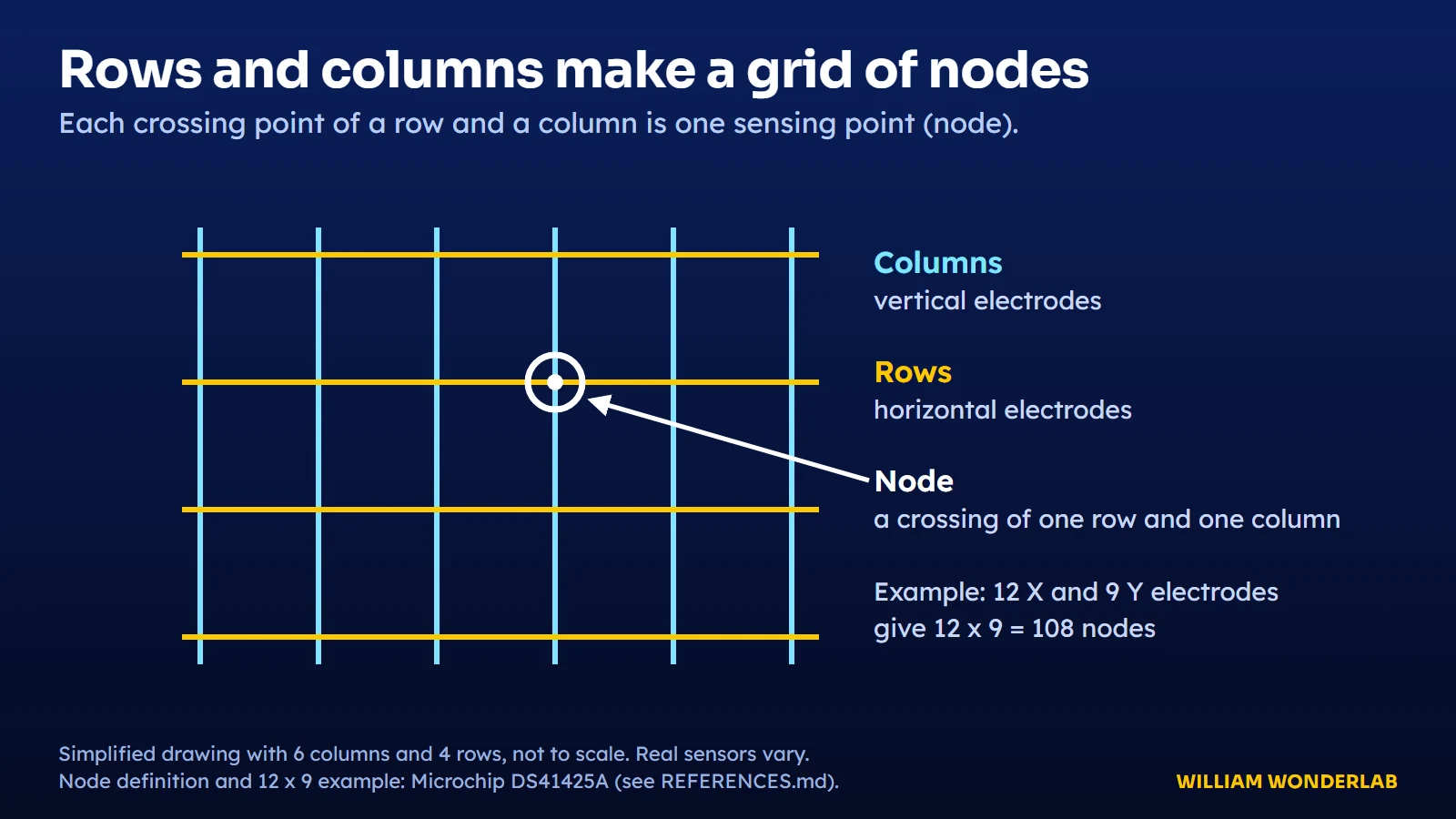
The grid is what turns a flat sheet of glass into a map of measuring points. Microchip’s example sensor has 12 X electrodes and 9 Y electrodes, “which creates a 12×9 node matrix.”[2] Twelve columns times nine rows gives 108 nodes on one small sensor. Each one is a place the controller can check.
Capacitance: a place to hold charge
Capacitance is a measure of how much electric charge two conductors can hold when they are placed close together. A simple example is two flat metal plates facing each other. The science reference HyperPhysics explains that capacitance “is typified by a parallel plate arrangement and is defined in terms of charge storage,” with Q as the charge stored on each plate and V as the voltage applied to the plates.[4]
Think of a capacitor as a small charge store. For the same push of voltage, a larger store holds more charge. Anything that changes the store, such as an object coming close to one of the plates, changes the reading. That is the principle a touchscreen uses.
Your body joins the circuit
Your body is conductive, which is why it can change the sensor. The Touchscreen Museum, a technology page published by DMC Co., Ltd., says that “Human body is conductive since it contains a lot of water.”[5] Because the body conducts, a fingertip near the electrodes becomes part of the electrical picture.
Texas Instruments’ CapTIvate guide describes what happens at a crossing point when a hand touches a mutual-capacitance sensor: “The capacitance between the two electrodes is reduced.”[1] Microchip describes the same event as a side route for the signal: “A finger touch near the node (intersection) of the selected receiver and transmitter electrodes provides a capacitively coupled ‘touch’ shunting path for some of the pulse injected current.”[3] In plain words, the finger gives part of the signal another way to go, so less of it reaches the receiving electrode.
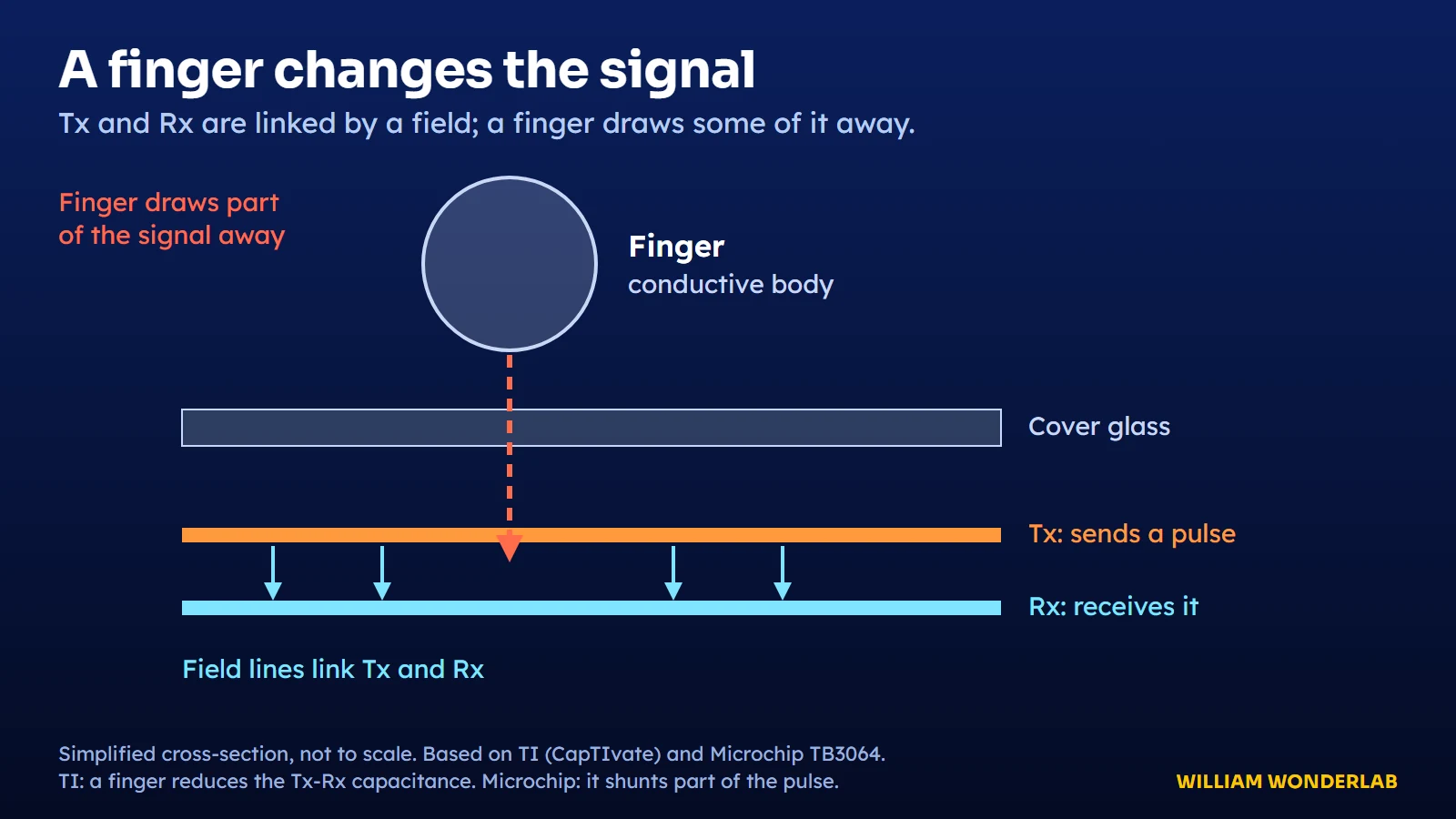
The change is small. TI says that, generally speaking, “the capacitance change caused by a finger touch is approximately 1 pF.”[1] (The guide has a typo there, writing “inductance” where it means capacitance.) NIST’s prefix table defines pico as “10-12” and a “trillionth”.[6] A picofarad is therefore one trillionth of a farad, which is why the controller needs careful measurements.
Did you know? TI’s general figure for a finger touch is about 1 pF, which is a trillionth of a farad. The controller has to see changes this small and still ignore electrical noise.[1][6]
Microchip also warns that the response to a fingertip “is influenced by many factors: touch areas, voltage and current levels, ambient humidity, static buildup, and related.”[2]
How the controller finds the spot
The controller does not look at the whole screen in one go. It measures node by node in a fixed order. Microchip’s theory guide describes the mutual-capacitance method this way: select one transmitter electrode, measure the receiver electrodes that it crosses, and ground all the other electrodes while each measurement is taken.[3]
Each reading is then compared with a baseline. Microchip’s development guide describes its processed values as “relative to the no-touch baseline condition.”[2] A node whose value has changed from its no-touch baseline is a candidate touch point.
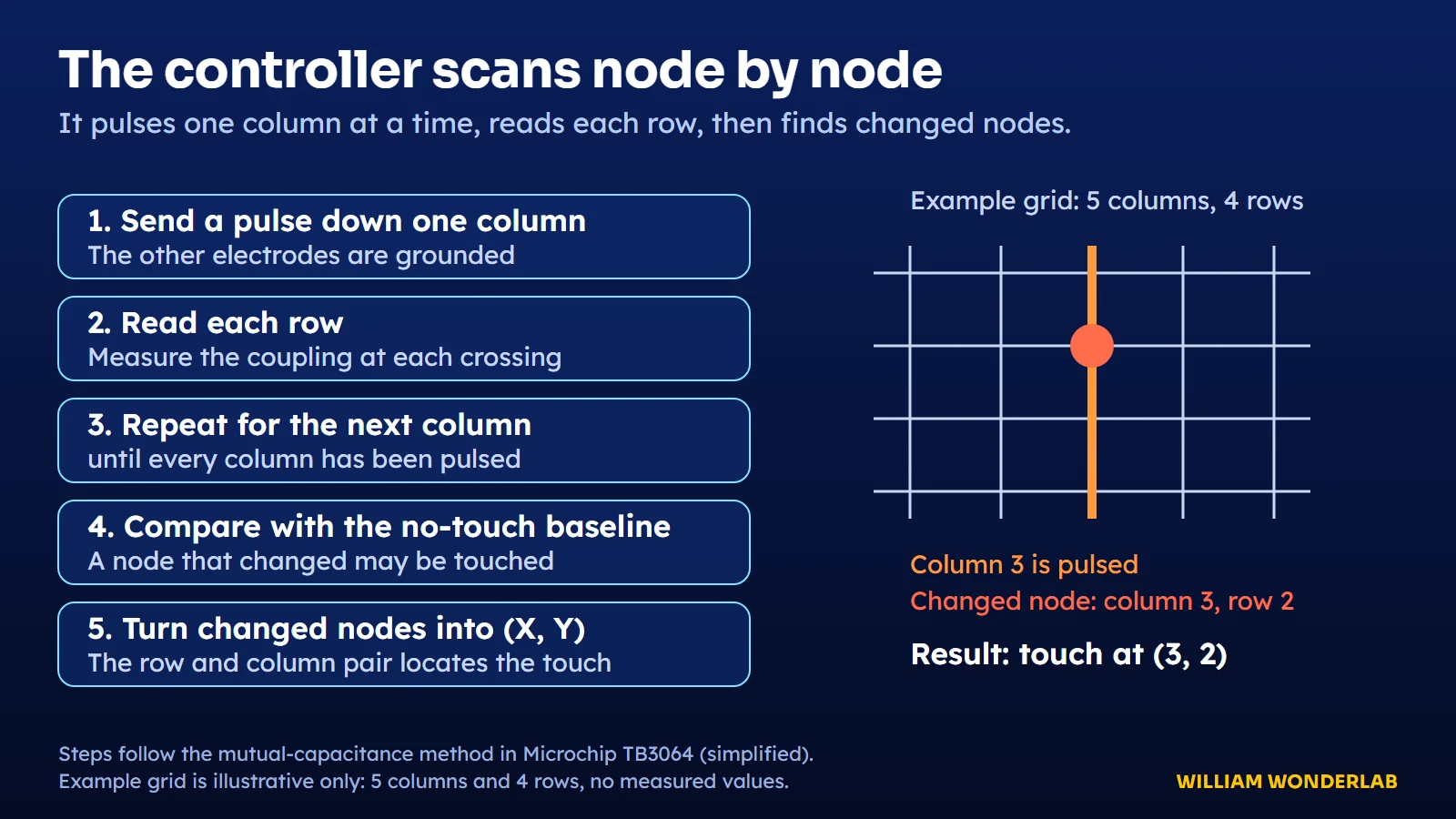
The last step is to match the results to the grid. Microchip says that mutual measurements let the controller “correlate touched X and Y axis electrodes into (X,Y) coordinate pairs.”[3] The Touchscreen Museum puts the same idea in plain terms: the sensor “checks where on the electrode lines the electrostatic capacitance changed.”[5]
Why not measure each line alone?
There is a simpler method called self-capacitance, which measures each electrode against ground. TI describes the two approaches this way: self-capacitive detection measures “the capacitance value between a single electrode and power line ground,” while mutual-capacitive detection measures “the capacitance value between two electrodes.”[1]
Self-capacitance can locate the touched rows and columns, but it struggles with several fingers at once. Microchip explains that “Measuring self capacitance does not easily lend itself to supporting multi-touch events, which requires correlation of multiple X and Y touched electrodes into multiple (X,Y) touch coordinates.”[3] Measuring each crossing point, as mutual capacitance does, is how Microchip describes tracking several touches at once.
Why the cover glass matters
The cover over the electrodes sits between your finger and the sensor. Its thickness changes how strong the signal is. TI’s guide lists this among the ways to change sensitivity: “Reduce the thickness of the cover plate to increase the sensitivity.”[1]
Try it: a rows-and-columns detective game
This is a proposed at-home activity. It is a paper model of the idea, not a working touchscreen.
You need: a sheet of paper, a pencil, a ruler and a partner.
- Draw a grid with 5 columns and 4 rows. Number the columns 1 to 5 across the top and label the rows A to D down the side.
- Your partner marks one box with a small dot, without showing you.
- Find the dot in two steps, as the controller does. First ask “Which column?”, then ask “Which row?”
- Swap roles and see whether you can find the dot in fewer questions.
- Write down how many questions each round took.
What to expect: Checking one set of lines at a time narrows the search quickly. The paper grid is only a model; it does not measure capacitance.
Safety first: Use pencil and paper only. This activity needs no electricity, batteries or sharp tools. Do not put the pencil near your eyes or mouth, and wash your hands after the activity.
Go deeper: capacitance and the cover
Parallel-plate capacitance
TI’s guide gives the parallel-plate formula for the sensor pad under a finger: “The parallel plate capacitance is calculated by:” C = ε0 × εr × A ÷ d. Here A is the contact area between the finger and the covering layer, d is the thickness of the overlay, and εr is the dielectric constant of the overlay. ε0 is a fixed physical constant.[1] HyperPhysics gives the same form for flat parallel plates.[7]
Look at how the formula behaves. Capacitance grows when the contact area A grows, and it shrinks when the thickness d grows. That matches TI’s advice to thin the cover to increase sensitivity. The guide also notes that electrode size cannot increase indefinitely, because the effective area of the finger’s plate is limited by the finger’s touch area.[1]
Self-capacitance and mutual capacitance compared
| Method | What it measures | Strength | Weakness |
|---|---|---|---|
| Self-capacitance | One electrode against ground | Fast response | Harder to track several touches[3] |
| Mutual capacitance | Two electrodes at each crossing | Tracks several touches | Slower, because every node is measured[3] |
Frequently asked questions
Why does a fingertip work on the screen?
A fingertip works because the body is conductive. Near the electrodes, a finger changes the capacitance between the sensing lines, and the controller detects that change.[5][1]
Can a touchscreen tell two fingers apart?
Yes, if it uses mutual-capacitance measurements at each crossing point. Microchip says these “enable position tracking of multiple simultaneous touch events.”[3]
Are the touch points the same as the screen’s pixels?
No. The touch points are the crossings of the sensor’s electrodes. Microchip defines a node that way, and a sensor’s node count is set by its electrodes, not by the display’s pixels.[2]
What is the difference between self-capacitance and mutual capacitance?
Self-capacitance measures one electrode against ground. Mutual capacitance measures the link between two electrodes, which is why it can locate several touches at once.[1][3]
The big idea
A grid, a finger and a map. Each crossing of a row and a column is a measuring point. A fingertip changes the electrical link at nearby points, and the controller reads which points changed to work out where you touched.
Related reading
More from William Wonderlab:
Explore more from scientists:
- Capacitance (HyperPhysics, Georgia State University)
- Metric (SI) Prefixes (NIST)
- CapTIvate Touch MCUs Getting Started Guide (Texas Instruments)
References
[1] Texas Instruments, “CapTIvate Touch MCUs Getting Started Guide (SLAU857A)” (accessed 25 October 2026)
[2] Microchip Technology Inc., “mTouch Projected Capacitive Touch Screen Sensing Development Kit User’s Guide (DS41425A)” (accessed 25 October 2026)
[3] Microchip Technology Inc., “mTouch Projected Capacitive Touch Screen Sensing Theory of Operation (TB3064)” (accessed 25 October 2026)
[4] HyperPhysics, Georgia State University, “Capacitance” (accessed 25 October 2026)
[5] Touchscreen Museum (DMC Co., Ltd.), “Technologies of Touchscreen (Projected Capacitive)” (accessed 25 October 2026)
[6] National Institute of Standards and Technology (NIST), “Metric (SI) Prefixes” (accessed 25 October 2026)
[7] HyperPhysics, Georgia State University, “Parallel Plate Capacitor” (accessed 25 October 2026)